Showing posts with label github. Show all posts

Wednesday, March 29, 2017

Kamailio - Over 25 000 Commits In Master Branch

While checking the last pull requests on Kamailio’s Github repository, I noticed that the number of commits to master branch has just surpassed 25 000 (not counting at all commits to stable releases or personal branches). They are counted from the very first day back in September 2001, the migration to Git few years ago converted the commits from old CVS and SVN times.
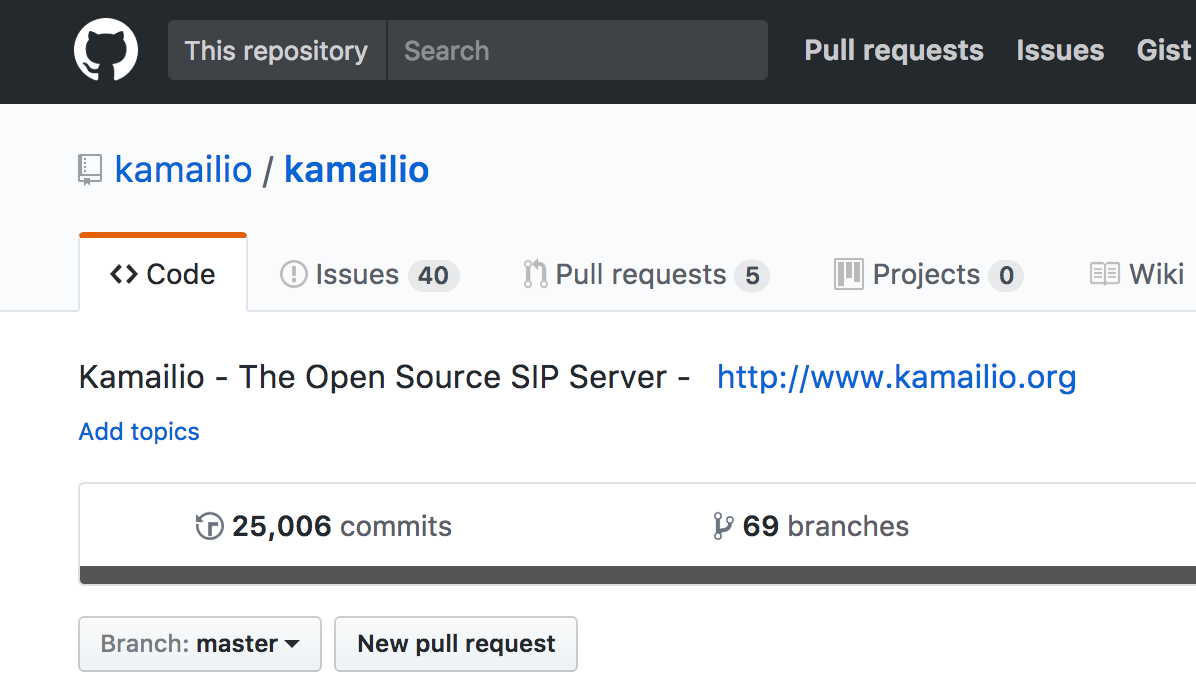
While number of commits is not necessarily a metric of the quality of code, it does reveal a constant and consistent development effort performed during the past 15 years and a half, averaging over 1500 commits per year (n.r., last years with way more commits than the early one due to increase of the number of contributors).
The growth of Kamailio development isn’t slowing down at all. The last major release, Kamailio v5.0.0, was out about one month ago and since then we have 3 new modules already part of the master (topos_redis, ims_diameter_server and call_obj modules) and one is pending to be merged being now a pull request (keepalive module).
Many thanks to all developers and users that contributed to enhance the set of features, quality and stability of Kamailio over all these years!
Should you want to meet face to face with many Kamailio developers, be sure you reserve in time a seat at Kamailio World Conference, Berlin, May 8-10, 2017!

Monday, December 15, 2014

Main Kamailio GIT Repository Hosted on Github

Today we moved the source code management away from an old server to a new infrastructure, based on Github. The main GIT repository that all developers use for development of Kamailio is now on a new address. The web link to it is:
The old server that was hosted by us became very old and is going to be decommissioned very soon.
For users (that cloned read-only from git.sip-router.org in the past) – it should be no change – just be sure that the DNS change has been propagated to you, because git.sip-router.org is pointing now to another server which has a real-time clone of Github repository. To know if DNS was updated on your side, browse to:
an you must be directed to Gitlist web interface:
If you end up in an URL with gitweb on it, the DNS cache on your side is still pointing to the old server.
The listed kamailio and sip-router projects are the same (the second is kept for historical reasons and it is a symlink to the first).
Gitweb is also running on the mirror, so the links from the email notifications of old commits are valid:
Once the DNS is updated, pulling/fetching in an existing clone done from git.sip-router.org should just work.
For developers – it requires to change the remote URL of your local clone to point to Github repository. Github provides access methods  via git/ssh or https: as an example of switching the remote URL to Github repository and do the push via https, got you your local clone directory and do:
git remote set-url origin https://github.com/kamailio/kamailio.git
Check the change with:
git remote -v
You should see:
origin https://github.com/kamailio/kamailio.git (push)
origin https://github.com/kamailio/kamailio.git (fetch)
When you try to push, it should ask you for your Github username and password. For Github repository access, see more details at:
GITHUB OctocatFrom now on all new commits will be pushed to github!
Hopefully the migration is going to be smooth for everyone!

Thursday, December 12, 2013

Kamailio Source Code Mirror on GitHub

The Git repository of Kamailio project hosted at git.sip-router.org is now mirrored in real time to GitHub at:
GitHub is known for its nice web interface to browse Git repositories as well as easy web-based mechanisms to fork projects and contribute back. We hope that the new way to access Kamailio sources will attract new people into playing directly with the code and get involved in the development process.
The main Git repository stays at sip-router.org and can be browsed at:
 Thanks to Victor Seva (twitter @linuxmaniac) for spending time on setting it up!